Two Different Problems
When we talk about "connecting networks," we are actually describing two distinct situations that require different hardware solutions.
The first situation: you want to extend a single network — make it larger, reach further, or handle more devices, while keeping it one unified network operating under the same protocols. The devices used here are repeaters, bridges, and switches.
The second situation: you want to connect two fundamentally different networks — networks that use incompatible protocols or technologies — while allowing each to keep its own internal character. The device used here is the router. The result is not a larger single network but a network of networks.
Understanding this distinction is the key to understanding what a router actually does — and why it is different from the other devices in your school's equipment closet.
Extending a Single Network
Three hardware devices can extend a single network by connecting its segments together. They differ in how intelligently they handle the traffic they see.
The Repeater: Brute Force Amplification
A repeater is the simplest network extension device. It receives signals from one network segment, amplifies them, and retransmits them onto another segment — without examining or filtering the content in any way. Whatever signal arrives, the repeater passes on.
Repeaters solve one specific problem: signal degradation over distance. Electrical and optical signals weaken as they travel through cable. A repeater placed along the cable path regenerates the signal so it can travel further. That is the entirety of a repeater's job.
The downside is that a repeater passes everything — useful messages and collision noise alike. Two segments connected by a repeater behave as one long segment: all traffic from both sides is visible everywhere, and collision domains merge.
The Bridge: Smart Filtering
A bridge connects two network segments like a repeater, but with a critical difference: it examines the destination address on each message before deciding whether to forward it. If a message's destination is on the same side of the bridge as its source, the bridge does not forward it — it stays local. Only messages destined for the other side cross the bridge.
This filtering makes the network more efficient. Traffic between devices on the same segment stays on that segment, reducing congestion on the other side. Two segments connected by a bridge can carry on independent conversations simultaneously, as long as those conversations are internal to each segment.
The Switch: Multiple Bridges in One
A switch is essentially a bridge with many connections rather than just two. Where a bridge connects two segments, a switch connects multiple segments — each device or group of devices gets its own connection into the switch, and the switch forwards each message only to the segment (or device) it is addressed to.
This is why switches are the standard device in modern wired networks. When you plug a laptop into a wall jack in a school or office, that jack connects to a switch somewhere in the building. The switch ensures your laptop's traffic goes only where it needs to go, rather than broadcasting it to every device in the building.
| Device | Connects | Examines Destination? | Filters Traffic? |
|---|---|---|---|
| Repeater | Two segments | No | No — passes everything |
| Bridge | Two segments | Yes | Yes — only forwards cross-segment traffic |
| Switch | Multiple segments | Yes | Yes — forwards to correct segment only |
When networks are connected via repeaters, bridges, or switches, the result is still one network — larger, but operating under the same protocols as the original segments. A device on one side does not know or care that a bridge or switch is in the path. From its perspective, it is just sending a message to another device on the same network.
The Access Point: Gateway to Wireless
An access point (AP) is the central device in a wireless star network. It serves as the focal point through which all wireless devices in the network communicate — devices do not communicate directly with each other but through the AP, which coordinates all wireless traffic.
The WiFi router in your home or the wireless access points mounted on classroom ceilings in your school are access points. When your phone "connects to WiFi," it is associating with an access point and agreeing to route all its wireless communication through it.
Access points are often combined with routing functionality in a single device (the home "WiFi router" is really an AP plus a router plus sometimes a switch, all in one box). We will distinguish these functions clearly in a moment.
Connecting Different Networks: The Router
Repeaters, bridges, and switches extend a single network. But what happens when the networks you want to connect use incompatible technologies? A WiFi network and a wired Ethernet network, for example, speak different protocols at the physical level. You cannot simply bridge them together — the signals are fundamentally different.
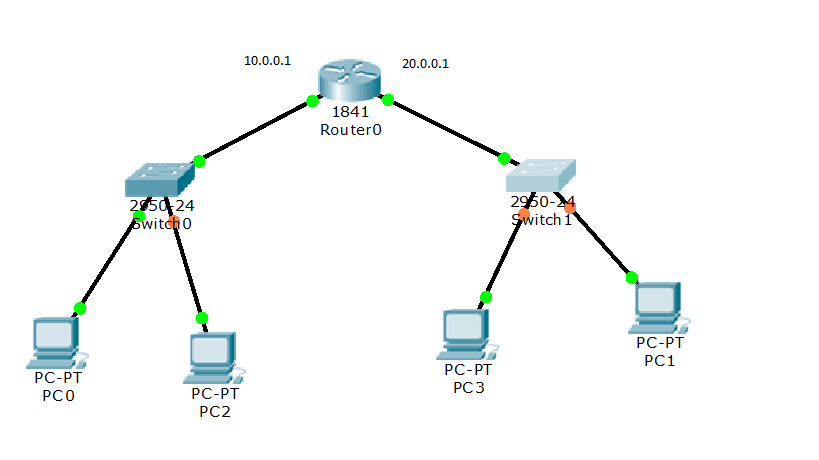
This is where the router comes in. A router's job is not to extend a single network but to connect multiple different networks while allowing each to maintain its own internal character and protocols. The result is a network of networks — what networking professionals call an internet (lowercase i).
Routers work by maintaining a forwarding table: a record of which direction to send messages based on their destination address. When a device on one network wants to send a message to a device on a different network, it sends the message to its local router. The router reads the destination address, consults its forwarding table, and forwards the message in the right direction — possibly through several more routers before it reaches its destination.
An analogy: Switches are like postal workers sorting mail within a single post office — they route letters to the right mailbox within their building. Routers are like the sorting centers that route packages between different post offices in different cities — they pass messages between distinct networks, each of which handles its own internal delivery.
The Gateway
The point where a local network connects to the outside internet is called a gateway. In most school and home networks, the gateway is the device that connects the internal LAN to the wider Internet — typically a router, or a combined router/access point device. When your school's network needs to reach a website on the Internet, all traffic flows out through the gateway.
An Important Distinction: internet vs. Internet
The word "internet" (lowercase i) refers to any network of networks — any collection of distinct networks connected by routers so that devices on different networks can communicate. By this definition, there are many internets: corporate internets connecting a company's offices worldwide, university internets connecting campuses, even the telephone network was technically a worldwide internet long before computers were involved.
The Internet (uppercase I) refers to one specific internet: the particular worldwide network of networks that you use every day to browse websites, send email, stream video, and communicate. It is the global public internet — the one that connects billions of devices worldwide through a shared, open set of protocols.
Why this distinction matters: Your school almost certainly has an internal internet — multiple networks (the administrative LAN, the student WiFi network, perhaps a separate network for the library) connected by routers while remaining somewhat separate. That internal collection is an internet. When your school connects to websites and services outside the building, it is connecting to the Internet. The school's internet is a small, private piece of the much larger public Internet.
What Comes Next
You now have a complete picture of the hardware layer: the devices that extend single networks (repeaters, bridges, switches, access points) and the devices that connect different networks (routers and gateways). Reading 3 moves up from the hardware to the communication models — how processes on different machines talk to each other, and how the idea of distributed computing emerges from networked systems.