Beyond the Hardware
Readings 1 and 2 covered the physical infrastructure of networks: how devices are classified, how protocols coordinate communication, and how hardware devices extend and connect networks. All of that is the foundation. But networks are not built for hardware to talk to hardware — they are built for software to talk to software.
When you load a webpage, a process running on your browser is communicating with a process running on a web server somewhere else in the world. When you use a video conferencing app, processes on your machine are exchanging data with processes on other machines in real time. This communication between processes running on different computers is called interprocess communication, and understanding how it is organized tells you a great deal about how the software you use every day is designed.
Two fundamental models govern how processes communicate across networks: client/server and peer-to-peer.
The Client/Server Model
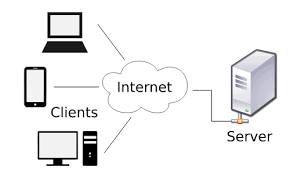
The client/server model divides communicating processes into two clearly defined roles:
- A client is a process that makes requests. It asks for something: a webpage, a file, a database query, a print job.
- A server is a process that satisfies requests. It waits, listening for clients to ask for something, and responds when they do.
This asymmetry is the defining feature of the model. The server must be running continuously, always ready to respond. The client runs only when the user needs something and reaches out to the server to get it. The relationship is not between two equal parties — it is between a service provider and a service consumer.
Everyday Examples
The client/server model is so pervasive that it is almost invisible:
- When you type a URL into a browser, your browser is a client making a request to a web server. The server sends back the HTML, images, and other files that make up the page.
- When you check your email, your email app is a client making a request to a mail server. The server retrieves and delivers your messages.
- When a classroom printer is shared across a school network, each computer sending a print job is a client; the machine managing the printer is a print server.
- When a school database stores student records, the office software accessing those records is a client; the machine hosting the database is a file server or database server.
Key Characteristics
Several features distinguish the client/server model:
- The server is typically more powerful than the client and is dedicated to serving many clients simultaneously.
- The server must be continuously available. A web server that goes offline means no one can load the website it hosts.
- The client initiates all communication. The server does not reach out to clients unprompted — it waits.
- The same machine can play different roles in different interactions. Your laptop might be a client when it requests a webpage, but it could be a server if it is running software that other machines connect to.
Client vs. server as roles, not machines: It is tempting to think of "a server" as a special type of hardware. In reality, client and server are roles played by software processes. The physical hardware running a server process is often a specialized machine (powerful, with lots of storage and network capacity), but the distinction is about the role the software plays, not the machine it runs on.
The Peer-to-Peer Model
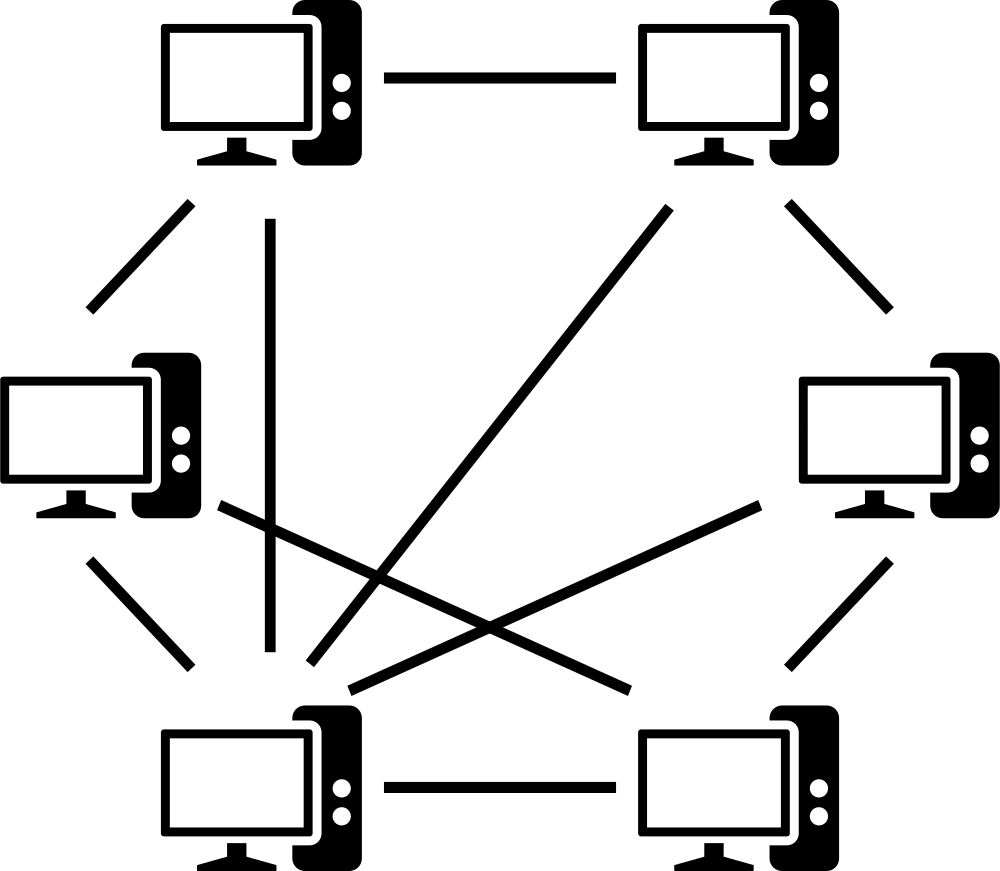
The peer-to-peer (P2P) model takes a different approach: instead of a dedicated server serving many clients, each participant both provides and receives services from the others. Every process in the system is simultaneously a potential client and a potential server — an equal among equals.
P2P communication tends to be more temporary and situational than client/server. Two people in a video call are peers: each is sending video to the other and receiving video from the other simultaneously. There is no central server managing that exchange — the connection is direct between the two participants.
Where P2P Appears
- File sharing: BitTorrent and similar systems distribute files across many peers rather than from one central server. Each peer downloads pieces of the file from others and simultaneously uploads pieces to others. The more peers sharing a file, the faster the distribution — because the load is spread across everyone rather than concentrated at one server.
- Messaging: Some messaging apps connect users directly rather than routing all messages through a central server.
- Multiplayer gaming: Some games connect players directly to each other rather than through a central game server.
- Blockchain systems: Cryptocurrencies and other blockchain technologies distribute record-keeping across many peers rather than maintaining a central ledger.
Client/Server vs. Peer-to-Peer: A Comparison
| Client/Server | Peer-to-Peer | |
|---|---|---|
| Roles | Distinct: one server, many clients | Equal: each participant both sends and receives |
| Availability | Server must run continuously | Peers connect and disconnect as needed |
| Scalability | Server can become a bottleneck | More peers = more capacity |
| Control | Centralized at the server | Distributed across all peers |
| Common uses | Websites, email, databases, streaming | File sharing, direct messaging, some games |
A note on terminology: You will often hear the phrase "peer-to-peer network," but this is a misuse of the term. Peer-to-peer describes a communication model used by software processes — it is not a property of the underlying network hardware. Two processes can use the P2P model to exchange files and then switch to the client/server model to load a webpage, all over the same physical network. The network does not care which model the software uses.
Distributed Systems: When Many Machines Act as One
The client/server and peer-to-peer models describe how two processes communicate. Distributed systems describe something larger: software systems whose components run as processes on many different computers across a network, but that function together as a unified whole.
Almost every large-scale service you use is a distributed system. When you search on Google, your query is not handled by a single computer — it is distributed across thousands of servers working in coordination. When you stream a video, the content is delivered from servers distributed geographically to minimize the distance data has to travel to reach you.
Three types of distributed computing systems are worth understanding:
Cluster Computing
A computer cluster is a group of computers working closely together to perform computation or provide services as if they were a single, more powerful machine. The individual computers in the cluster are typically connected by a high-speed local network and coordinate tightly with each other.
Clusters are designed for high availability (if one machine in the cluster fails, others continue serving requests) and load balancing (workload is distributed across machines so no single one becomes overwhelmed). A web service that never seems to go down is almost certainly running on a cluster rather than a single server.
Grid Computing
Grid computing takes a looser approach: it connects many computers — often geographically dispersed and used for other purposes — to collaborate on large computational tasks. Rather than dedicated machines working in tight coordination, a grid volunteers idle computing power from machines that happen to be available.
The BOINC project (Berkeley Open Infrastructure for Network Computing) is a well-known example: millions of home computers volunteer their idle CPU time to analyze scientific data — searching for signs of extraterrestrial intelligence, modeling protein folding, simulating climate patterns — work that no single computer could complete in a reasonable time.
Cloud Computing
Cloud computing is the model most familiar to teachers and students today. In cloud computing, large pools of computing resources — servers, storage, networking, software — are maintained by a provider and made available to clients on demand, typically over the Internet and typically for a fee.
The defining characteristic of cloud computing is that the client does not know or care where the physical computers are located, how many there are, or who maintains them. Google Drive stores your files "in the cloud" — meaning on Google's servers somewhere. Microsoft Azure, Amazon Web Services (AWS), and Google Cloud provide computing infrastructure that organizations can rent rather than build and maintain themselves.
For K-12 schools, cloud computing is now part of the daily infrastructure: Google Workspace for Education, Microsoft 365, learning management systems, and student information systems all run on cloud platforms. When a school "moves to the cloud," it is replacing locally-maintained servers with remotely-maintained ones — trading capital expense and maintenance responsibility for a subscription and an internet connection.
Cloud computing and the history of computing: Notice that cloud computing has something in common with the mainframe/terminal model from the 1960s that we discussed in Topic 3a. In both cases, a lightweight client device depends on powerful remote servers for actual computation and storage. The pendulum has swung again — from centralized mainframes, to personal computers, to cloud services that re-centralize computation in massive data centers. The difference is that today's "terminals" are extraordinarily capable on their own; they just choose to offload much of their work to the cloud.