Why Networks Exist
A computer on its own is useful. A computer connected to other computers is dramatically more useful. Networks exist because the value of sharing information and resources — files, printers, internet connections, software, storage — far exceeds the cost of building the connections that make sharing possible.
A network is simply a collection of computers and devices connected so that data can be transferred from machine to machine. That definition covers everything from the two computers in a home office sharing a printer, to the billions of devices connected through the global Internet. The scale varies enormously. The underlying idea does not.
LAN and WAN: The Two Scales That Matter
Networks are commonly classified by their geographic scope. For our purposes, two classifications cover most of what you need to know:
Local Area Network (LAN)
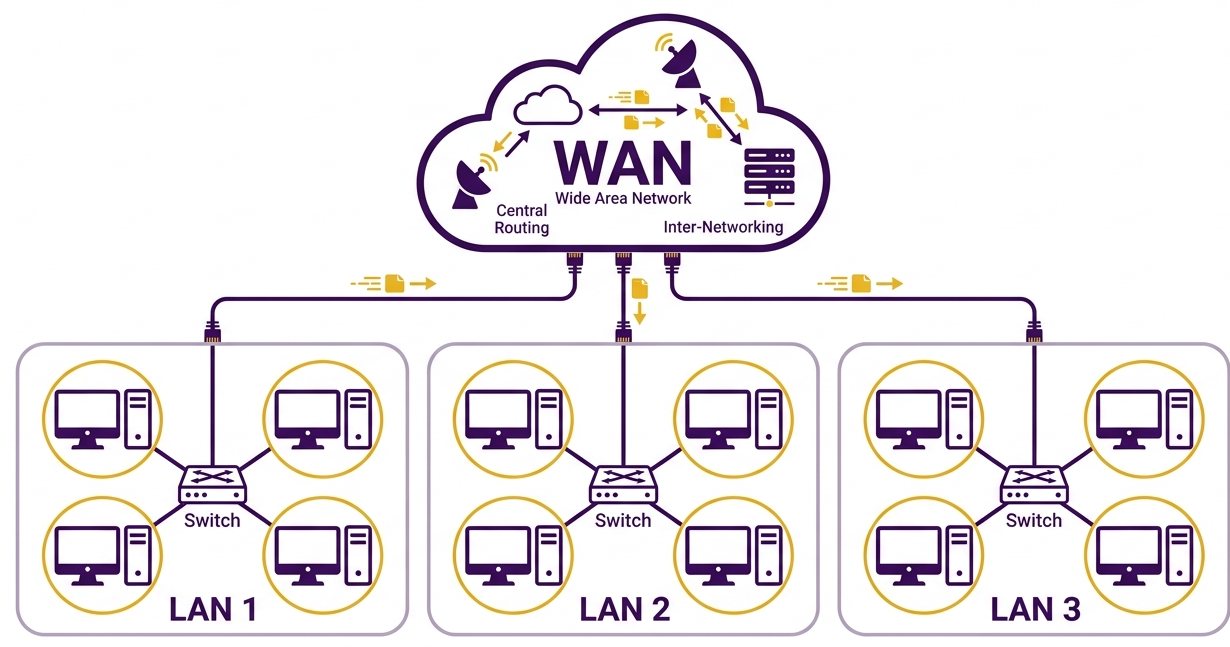
A local area network (LAN) connects computers within a limited geographic area — typically a single building or building complex. A school computer lab is a LAN. The network connecting all the computers, printers, and devices in an office building is a LAN. A home network connecting a laptop, a smart TV, and a few phones is a LAN.
LANs are characterized by relatively short distances between devices, high data transfer speeds, and the fact that a single organization typically owns and manages the entire network. Because all the devices are nearby, LANs can use high-speed connections without the expense of long-distance infrastructure.
Wide Area Network (WAN)
A wide area network (WAN) connects computers over much larger distances — across cities, countries, or even continents. The Internet is the largest and most well-known WAN, but many organizations operate their own private WANs to connect offices in different cities or countries.
WANs typically involve infrastructure that crosses public or leased territory: fiber optic cables buried under streets, submarine cables running across ocean floors, or satellite links spanning continents. This infrastructure is expensive to build and usually operated by telecommunications companies rather than individual organizations.
LAN vs. WAN in a school context: Your school's internal network — connecting classrooms, the library, the office, and the server room — is a LAN. When that school network connects to the Internet, it is connecting to a WAN. The router (or gateway) at the edge of your school's network is the boundary between the two.
Telling Them Apart
The key question when distinguishing a LAN from a WAN is not whether the connection is wired or wireless, or how many devices are involved. It is geographic scope. A network confined to a single site is a LAN. A network spanning multiple sites across significant distances is a WAN.
In practice, most organizations operate a LAN that connects to a WAN. Your school network is a LAN. The Internet is the WAN it connects to. The link between them is managed by an Internet Service Provider (ISP) — a topic we will return to in Topic 4b.
Open Networks vs. Proprietary Networks
Networks can also be classified by whether their underlying designs are publicly available or privately owned. This distinction turns out to matter enormously for how widely a network technology gets adopted.
An open network is built on designs and standards that are freely available to anyone — no license fees, no contract requirements, no permission needed. Anyone who wants to build a device or software that works with an open network can do so. This openness tends to drive adoption: when no single company controls a standard, many companies compete to build the best products that implement it, which drives down prices and drives up quality.
A proprietary network (sometimes called a closed network) is built on designs owned and controlled by a specific company. Using or building products for a proprietary network requires licenses, fees, or agreements. This gives the owning company control and income, but tends to limit adoption — organizations are reluctant to commit to infrastructure they do not control and cannot switch away from without the owner's permission.
History has repeatedly shown that open networks tend to win in the long run. The Internet — built on open standards — became the dominant global network precisely because anyone could connect to it, build for it, and extend it without asking permission. The TCP/IP protocol suite that governs Internet communication is an open standard, freely usable by anyone.
How Networks Are Arranged: Topologies
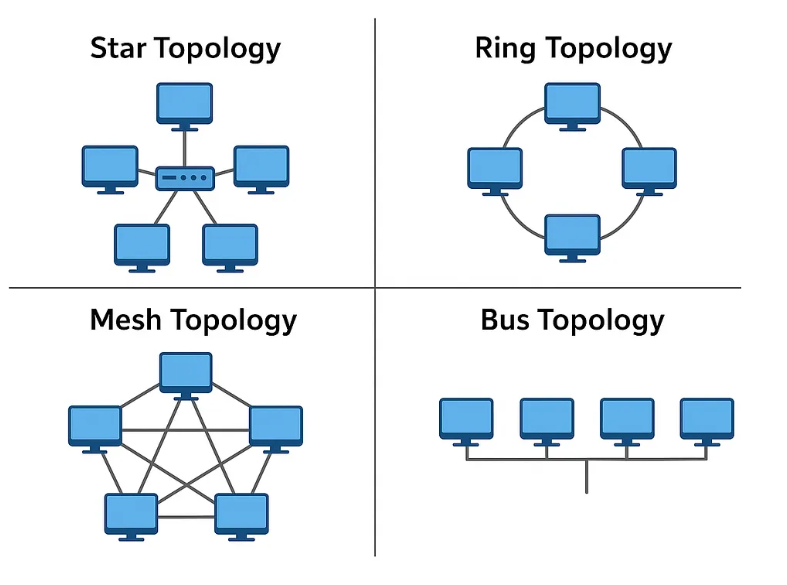
Beyond classification by size or ownership, networks can also be described by their topology — the pattern in which devices are connected to each other. Two topologies are particularly important to understand.
Bus Topology
In a bus topology, all devices connect to a single shared communication line — the bus. Any device that wants to send a message broadcasts it onto the bus, and every other device on the network receives it. Each device checks the destination address on each message and keeps only those addressed to itself.
This approach is simple and inexpensive, but it has a coordination problem: what happens when two devices try to transmit at the same moment? Their signals collide and become garbled. Managing this collision problem is exactly what network protocols are designed to handle — more on that in a moment.
Bus topology was the foundation of early Ethernet networks and dominated wired networking through much of the 1990s. While it has largely been superseded in modern wired networks, understanding it is essential for understanding how Ethernet and WiFi protocols work.
Star Topology
In a star topology, all devices connect to a single central device rather than to each other directly. Communication between any two devices on the network passes through the central device, which coordinates the traffic.
Today's wired networks typically use a central device called a switch (which we will examine closely in Reading 2). Today's wireless networks use a central device called an access point (AP). When you connect your phone or laptop to your school's WiFi, you are connecting to an access point — and your device is one spoke in a star topology centered on that AP.
Star topology is now dominant in both wired and wireless networks because the central device can manage traffic intelligently, sending each message only to its intended recipient rather than broadcasting it to everyone.
Physical vs. logical topology: A network that looks like a star (all cables running to a central point) does not necessarily operate like one. An older device called a hub physically looks like the center of a star, but functionally behaves like a bus — it just rebroadcasts every signal it receives to every connected device. The distinction between a hub and a switch matters more than the physical arrangement of cables.
Protocols: The Rules That Make It Work
A network is not just cables and devices. It is an agreed-upon set of rules that governs how those devices communicate. These rules are called protocols.
Without protocols, networked communication would be chaos. Every device might try to transmit at the same moment. Messages might be formatted in incompatible ways. Devices from different manufacturers would be unable to understand each other. Protocols solve all of these problems by establishing shared expectations: what format a message must take, how devices take turns transmitting, how errors are detected and handled, and how a receiving device signals that it understood a message.
Protocols are not unique to computing. A handshake is a protocol for greeting. Parliamentary procedure is a protocol for conducting meetings. Air traffic control is a protocol for coordinating aircraft. In each case, the protocol exists because coordination among multiple parties requires agreed-upon rules — not just good intentions.
Protocols for Wired Networks: CSMA/CD
Wired Ethernet networks use a protocol called CSMA/CD (Carrier Sense, Multiple Access with Collision Detection) to manage the problem of multiple devices wanting to transmit at the same time. The protocol works like this:
- Before transmitting, a device listens to the network to check whether it is silent (Carrier Sense).
- Multiple devices have equal access to the network (Multiple Access).
- If two devices transmit simultaneously and their signals collide, both detect the collision (Collision Detection), stop transmitting, wait a brief random period, and try again.
The random wait time is essential — if both devices waited the same fixed amount of time, they would collide again immediately. Randomness ensures they are unlikely to retry at exactly the same moment.
Protocols for Wireless Networks: CSMA/CA and WiFi
Wireless networks cannot use CSMA/CD because a transmitting device cannot reliably detect whether its signal is colliding with another — its own signal drowns out everything else. There is also the hidden terminal problem: two devices may both be in range of the access point but out of range of each other, so neither knows the other is transmitting.
Instead, wireless networks use CSMA/CA (Carrier Sense, Multiple Access with Collision Avoidance). Rather than detecting collisions after they happen, CSMA/CA tries to prevent them in the first place. A device that wants to transmit waits for a quiet channel, then waits an additional brief period before transmitting — giving priority to devices that have already been waiting.
WiFi — the wireless networking standard you use every day — is built on CSMA/CA protocols standardized under the IEEE 802.11 family of specifications. When your phone connects to a school WiFi network, it is following these protocols every time it sends or receives data.
Why protocols matter for teachers: When a student complains that "the WiFi is slow," there is usually a protocol-level explanation. Too many devices competing for the same access point means more collisions and retransmissions. Walls and distance weaken signals, increasing errors. Understanding that wireless communication is a shared, rule-governed medium — not a dedicated pipe — helps explain many of the performance issues students and teachers encounter in school networks every day.
What Comes Next
You now have the foundation: networks classified by scope (LAN vs. WAN), by ownership (open vs. proprietary), by topology (bus vs. star), and governed by protocols that make communication reliable and orderly. Reading 2 looks at the hardware devices that connect networks to each other — and at the important distinction between extending a single network and connecting multiple different networks together.