What the CPU Actually Does
The Central Processing Unit (CPU) is often compared to the "brain" of the computer. It runs every instruction a program needs, from adding numbers to making decisions. To help make sense of this complex hardware, we can imagine the CPU as a busy teacher managing a structured classroom.
In this reading, we will introduce the key internal components of the CPU and how they work together during the fetch-decode-execute cycle — the heartbeat of all computer processing.
A Simplified View of the CPU
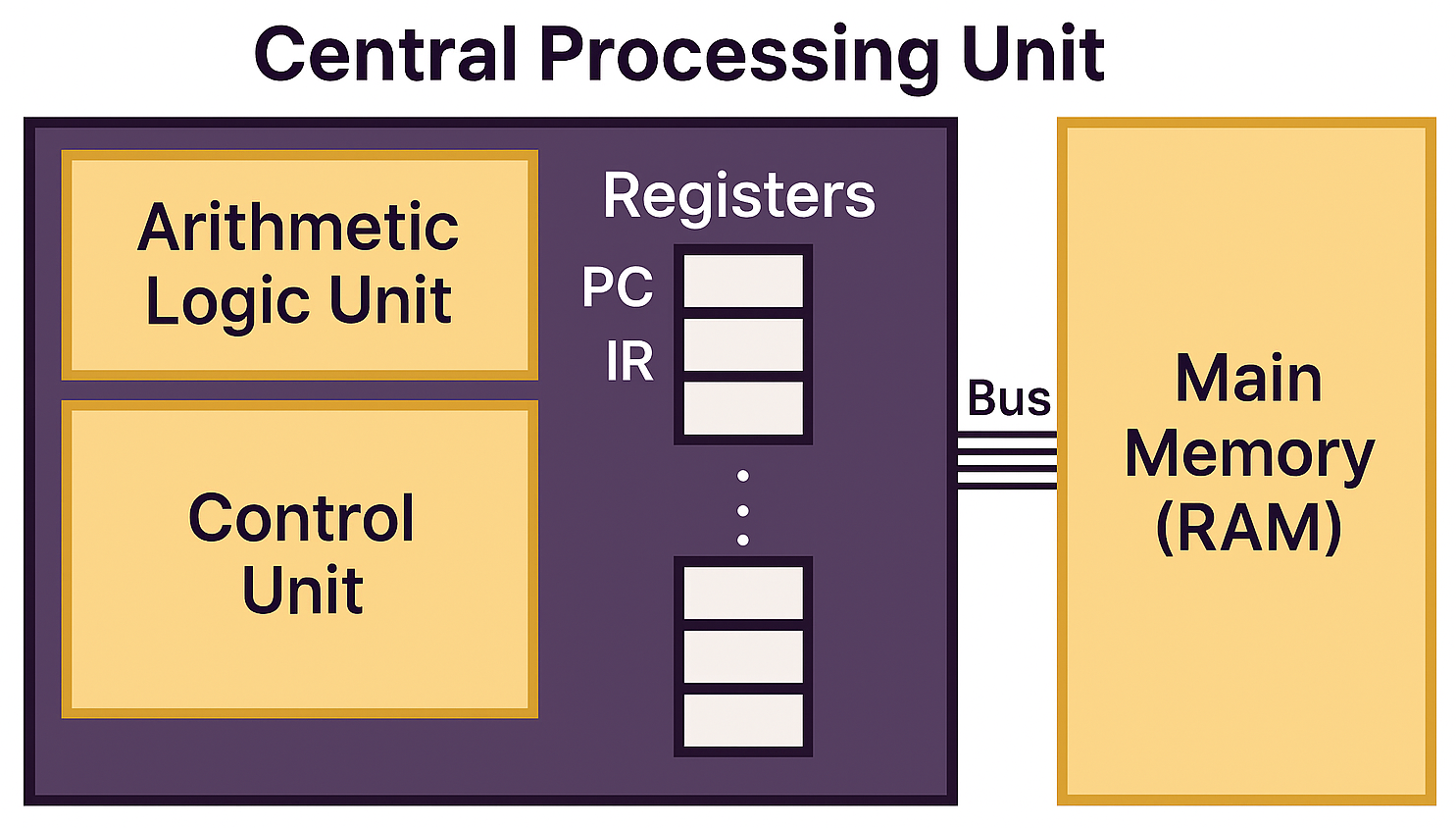
The diagram below (Figure 2a) provides a high-level view of how instructions move through the CPU. You will see the major components labeled: the Control Unit, the Arithmetic Logic Unit (ALU), and the collection of registers the CPU uses as its immediate workspace.
The Arithmetic Logic Unit (ALU)
The ALU is the part of the CPU that actually "does the math." In our classroom, the ALU is like the student at the whiteboard performing the actual work.
Any time a program adds numbers or performs logical operations (like the AND, OR, and XOR gates you learned about in Topic 2a), the ALU is at work. It is a high-speed calculator that handles both math and comparisons (like "is this number bigger than that one?").
The Control Unit (CU)
While the ALU performs operations, the Control Unit acts as the conductor. In our metaphor, the CU is the Teacher.
The Teacher doesn't do the math on the board; instead, they manage the room. The CU decodes the instructions and sends signals to the rest of the computer saying, "ALU, add these," or "Memory, send me the next piece of data."
Registers: Post-it Notes on the Desk
Registers are small, high-speed storage locations inside the CPU. Because space inside a CPU is limited, registers can only hold one piece of information at a time.
Think of a Register as a Post-it Note on the teacher's desk. You can only fit one number or one word on a Post-it. If you need to store a new value, you have to peel off the old note and replace it. Even though they are tiny, they are essential because the Teacher (CU) and Student (ALU) can grab them instantly without walking all the way to the filing cabinet (RAM).
The Program Counter (PC)
The Program Counter is a special register that keeps track of where we are in a program. It holds the address of the next instruction to be executed.
In the classroom, imagine a numbered list of tasks written on the wall. The PC is like a magnet pointing to the next step on that list. Once a step is finished, the teacher moves the magnet down to the next number so the class never loses its place.
The Instruction Register (IR)
The Instruction Register holds the specific instruction currently being executed.
If the PC is the magnet pointing to a task number, the IR is the Task Card the teacher is currently holding and reading out loud. The teacher fetches the card that matches the magnet's number, holds it up (the IR), and explains it to the class so the work can begin.
Putting It All Together: The Fetch-Decode-Execute Cycle
Every action your computer takes — opening a file, scrolling a page, running a program — is built from billions of tiny repetitions of the same simple loop:
- Fetch: The Teacher looks at the magnet (PC), goes to the filing cabinet (RAM), and grabs the Task Card (IR).
- Decode: The Teacher (CU) reads the card to figure out what it means.
- Execute: The Student (ALU) performs the math or logic listed on the card.
This cycle is so central to computing that it drives everything else we will study this week. We will examine it in much greater detail in Topic 2e.