The Internet Is Not the Web
One of the most common confusions in everyday technology conversation is treating "the Internet" and "the Web" as synonyms. They are not. Understanding the distinction is both technically important and practically useful for a CS teacher.
The Internet is the global infrastructure: the physical cables, wireless signals, routers, and protocols that connect billions of devices worldwide. It is the network of networks described in Reading 1: the road system, if you will.
The World Wide Web (or simply the Web) is one application that runs on the Internet. It is a system of interlinked documents — webpages — that can be accessed through a browser. The Web uses the Internet to transmit its documents, but it is not the Internet itself. Email, video calls, online gaming, file transfers, and streaming music all use the Internet too — none of them are "the Web."
The road analogy extended: The Internet is the highway system. The Web is one type of vehicle that uses those highways. Email, VoIP calls, and streaming video are other types of vehicles. The road does not care what kind of vehicle uses it — and the Internet does not care whether it is carrying a webpage, an email, a video call, or a game.
How the Web Works
The World Wide Web was created by Tim Berners-Lee in 1990. Working at the CERN physics laboratory in Switzerland, he realized that combining the Internet's connectivity with the concept of hypertext — documents that contain links to other documents — would create a powerful, flexible information system. His original software implemented the three key components that still define the Web today: a document format (HTML), a protocol for transferring documents (HTTP), and a server that supplied documents on request.
The Web is a classic client/server system. The two participants are:
- A browser (the client): software running on your device that requests webpages, receives them, and displays them to you. Chrome, Firefox, Safari, and Edge are all browsers.
- A web server (the server): software running on a remote computer that stores webpages and delivers them to browsers that request them. Apache, Nginx, and Microsoft IIS are common web server software packages.
Communication between browsers and web servers follows a protocol called HTTP (Hypertext Transfer Protocol). Every time you load a webpage, your browser sends an HTTP request to a web server, and the server sends back an HTTP response containing the webpage's content.
When the connection is encrypted for security — as indicated by the padlock icon in your browser — the protocol is HTTPS (the S stands for Secure). HTTPS is now the standard for any website handling sensitive information, and increasingly for all websites.
HTML: The Language of Webpages
Webpages are written in HTML (Hypertext Markup Language). An HTML document is a text file containing both the content of the page (the words, images, and links you see) and instructions for how to display it, encoded using special symbols called tags.
Tags are enclosed in angle brackets. For example, a heading tag might look like
<h1>Welcome to My Page</h1>. The browser reads the
HTML, interprets the tags, and displays the formatted result. You see the
formatted webpage; the tags remain invisible unless you specifically ask to see
the source code.
HTML also includes tags for creating hyperlinks — the clickable text or images that send you to another webpage when clicked. These hyperlinks are what make the Web a web: an interconnected system of documents rather than isolated pages.
How Pages Are Found: URLs
Every document on the Web has a unique address called a URL (Uniform Resource Locator). When you type an address into a browser or click a link, you are providing or following a URL. Understanding how a URL is structured helps you read web addresses intelligently.
A full URL has four parts. Consider this example:
http://eagle.mu.edu/authors/Shakespeare/Julius_Caesar.html
| Part | Example | What It Means |
|---|---|---|
| Protocol | http:// |
How the browser should communicate with the server. Usually
http or https (the secure version). |
| Domain name (host) | eagle.mu.edu |
The mnemonic address of the server holding the document. The browser uses DNS to translate this into an IP address. |
| Directory path | /authors/Shakespeare/ |
The folder path on the server where the document is stored. Works just like a folder path on your own computer. |
| Document name | Julius_Caesar.html |
The specific file being requested from the server. |
Not every URL includes all four parts. If the directory path or document name
are absent, the server returns a default page — usually the site's home
page. This is why typing just google.com into a browser still
works: the browser assumes https:// and the server returns its
default home page.
Requesting a web page
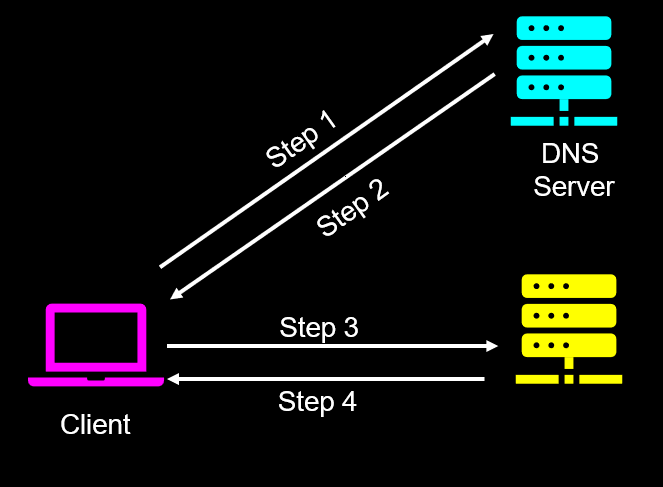
The process of loading a webpage in your favorite browser is more sophisticated than it first appears. While you interact with human-readable URLs, computers communicate using numerical IP addresses. Before your browser can display a site, it must perform a rapid translation.
- Step 1: The Request for Translation. When you enter a URL (like www.uni.edu) into your browser, the browser first contacts a special kind of server called a DNS Server. It essentially asks, "What is the numerical address for this name?"
- Step 2: The IP Address Return. The DNS server looks up the URL in its global directory and returns the corresponding IP address to your browser (for example, converting www.uni.edu to 134.161.54.103).
- Step 3: The Connection. Now that your browser knows the specific "coordinates" of the destination, it builds a formal request for the webpage and sends it across the Internet to the correct web server.
- Step 4: The Delivery. Finally, the web server receives the request, retrieves the necessary HTML files and assets, and sends them back to your browser to be rendered on your screen.
A Related Address: Email
Email addresses follow a distinct but equally consistent structure. Every email
address has exactly two parts, separated by the @ symbol:
username@mail-server-domain
Consider the address ben.schafer@uni.edu:
| Part | Example | What It Means |
|---|---|---|
| Username | ben.schafer |
Identifies the specific person (or account) within that mail server's domain. Chosen by the user or assigned by the organization. |
| @ symbol | @ |
Separates the username from the mail server domain. Read as "at." There is always exactly one @ in a valid email address. |
| Mail server domain | uni.edu |
Identifies the mail server that handles email for this person. The sending mail server uses DNS to find the mail server at this domain and deliver the message there. |
The mail server domain follows the same domain name structure as a URL —
it includes the organization's name and a top-level domain. In ben.schafer@uni.edu,
the TLD is .edu, identifying this as an educational institution.
In schafer.uni@gmail.com, the TLD is .com and the mail
server is operated by Google.
A common misconception: Many people assume their email
username and their name are the same thing, or that the part after the @
is "just Google" or "just school." In practice, organizations often assign
usernames that follow specific formats (first initial + last name, employee
ID, etc.), and the domain after the @ specifically identifies which
mail server will receive and store the message. Two people can have
the same username at different domains — jschafer@uni.edu
and jschafer@asu.edu are completely different people at
completely different mail servers.
For your classroom: Email address structure is a natural entry point for teaching about internet addressing at the elementary level. Students encounter email addresses early — on field trip permission slips, school communications, and teacher contact information. Helping students understand that the @ symbol divides "who" from "where" gives them a concrete mental model that connects to how the Internet routes information to the right place. It also sets up later discussions about why you cannot just make up any email address and expect it to work.
Internet Applications Beyond the Web
The Web is the most visible Internet application, but it is far from the only one. Several other applications run on the Internet using their own protocols and servers.
Electronic mail is one of the oldest and most enduring Internet applications. When you send an email, it travels from your device to a mail server operated by your email provider, which then routes it to the mail server for the recipient's domain, where it waits until the recipient retrieves it.
Several protocols are involved. SMTP (Simple Mail Transfer Protocol) handles the sending and routing of email between mail servers. When you retrieve your email, either POP3 (Post Office Protocol) or IMAP (Internet Mail Access Protocol) is used. POP3 downloads messages to your device. IMAP keeps messages on the server and syncs them across all your devices — which is why your email looks the same whether you check it on your phone, laptop, or a school computer.
Voice over IP (VoIP)
VoIP (Voice over Internet Protocol) uses the Internet to carry voice conversations rather than traditional telephone networks. When you use FaceTime audio, Google Meet, Zoom, or Microsoft Teams for a voice or video call, you are using VoIP. Your voice is converted to digital data, sent over the Internet as packets, and reassembled and played back at the other end.
VoIP has largely replaced traditional telephone systems in many organizations. School phone systems increasingly run over the school's network rather than through traditional telephone wiring, which reduces cost and simplifies management.
Streaming Media
Streaming delivers audio and video content over the Internet in real time rather than requiring the user to download a complete file before playing it. Netflix, YouTube, Spotify, and podcast apps all use streaming.
Streaming at scale requires special infrastructure. A single server sending individual streams to millions of simultaneous viewers would be quickly overwhelmed. Large streaming services use content delivery networks (CDNs) — geographically distributed groups of servers that store copies of popular content and serve it from whichever server is closest to each viewer. This is why a Netflix video loads quickly regardless of where Netflix's main servers are located — the content is likely coming from a CDN server relatively close to you.
Internet Servers: The Machines Behind Everything
Every Internet application depends on servers — computers running continuously, waiting for client requests and responding to them. Different applications use different types of servers, each specialized for a particular task.
| Server Type | What It Does | Example |
|---|---|---|
| Web server | Stores and delivers webpages to browsers that request them via HTTP | The server hosting your school's website |
| Mail server | Receives, stores, and forwards email messages using SMTP, POP3, and IMAP | Google's Gmail servers, your school district's email server |
| DNS server | Translates domain names into IP addresses for devices that need to connect to named hosts | Your ISP's DNS server, Google's public DNS (8.8.8.8) |
| File server | Stores files and makes them accessible to authorized users on a network | A school network drive, Google Drive's backend servers |
| Media/streaming server | Stores and delivers audio and video content to users on demand | Netflix CDN servers, YouTube's content delivery infrastructure |
It is worth noting that a single physical machine can run multiple server processes simultaneously. A school's server room might host a web server, a file server, and a mail server all on the same hardware. The server type refers to the role the software plays, not to a dedicated piece of hardware.