The Scheduler and the Dispatcher
In Reading 1, we established what a process is and how the OS tracks all of them in a process table. But tracking processes is only half the job. The OS also has to decide who gets to use the CPU — and when. That is the work of two closely related components: the scheduler and the dispatcher.
The Scheduler
The scheduler maintains the process table and decides which processes are eligible to receive CPU time. It handles the big-picture questions: Which processes are currently in the system? Which are ready vs. waiting? What priority should each receive? When a new application is launched, the scheduler adds it to the process table. When an application closes, the scheduler removes it.
The scheduler does not directly control when processes run — that is the dispatcher's job. The scheduler sets the priorities and maintains the list; the dispatcher uses that list to actually allocate CPU time.
The Dispatcher
The dispatcher is the component that actually hands the CPU to processes. It does this by dividing time into short segments called time slices — typically measured in milliseconds or even microseconds. Each time a process gets a turn, the dispatcher gives it one time slice. When the time slice expires, the dispatcher takes the CPU away and gives it to the next process in the queue. This is called a process switch (or context switch).
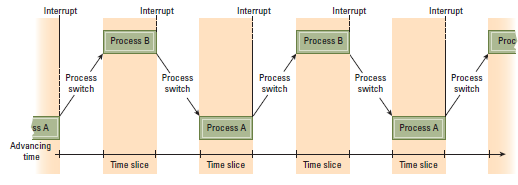
The dispatcher consults the process table (maintained by the scheduler) to determine which ready process has the highest priority and should receive the next time slice.
How Time Slices End: The Interrupt
How does the dispatcher know when a time slice has expired? It uses a hardware mechanism called an interrupt.
Each time the dispatcher gives a time slice to a process, it also starts a hardware timer. When the timer expires, it sends an interrupt signal to the CPU. The CPU reacts to this signal in a precise sequence:
| Step | What Happens |
|---|---|
| 1. Complete current instruction | The CPU finishes whatever machine instruction it was in the middle of. It does not stop mid-instruction. |
| 2. Save process state | The CPU saves the current process's complete state — program counter value, register values — into the process table entry for that process. This is what makes it possible to resume the process later. |
| 3. Execute interrupt handler | The CPU jumps to a special program called the interrupt handler, which is part of the dispatcher. This program determines how to respond to the interrupt. |
| 4. Select next process | The dispatcher consults the process table, selects the highest-priority ready process, and restarts the timer. |
| 5. Restore process state | The dispatcher loads the saved state of the selected process back into the CPU registers and program counter, and execution resumes from exactly where that process left off. |
From the perspective of each individual process, this is invisible. A process has no way to know that it was paused and resumed — it simply continues executing as if nothing happened. The illusion of simultaneous execution is complete.
Interrupts are not used only for time slice management. Every time you click a mouse, press a key, or plug in a device, an interrupt signal is generated. The CPU pauses its current activity, handles the interrupt (processes the keystroke, recognizes the device), and then returns to what it was doing. The interrupt mechanism is one of the most fundamental coordination tools in all of computing.
Why Multiprogramming Actually Makes Things Faster
At first glance, the overhead of multiprogramming seems wasteful. All that saving and restoring of process states, all that shuffling between processes — wouldn't it be faster to just run one process to completion before starting the next?
In most cases, no. Here is why.
Processes spend a surprisingly large fraction of their time waiting. When a process requests data from a magnetic disk, the disk might take several hundred milliseconds to locate and deliver the data. In computing terms, that is an enormous amount of time — enough for the CPU to execute millions of instructions. Without multiprogramming, the CPU would sit idle during that entire wait, doing nothing useful.
With multiprogramming, the moment a process enters a waiting state (say, waiting for a disk read), the scheduler marks it as waiting and the dispatcher stops giving it time slices. The CPU is immediately redirected to another ready process. When the disk read eventually completes, the scheduler marks the first process as ready again, and it re-enters the competition for time slices.
The result is that the CPU is almost always doing something useful. The overall throughput of the system — the total amount of work completed per unit of time — is dramatically higher than it would be with sequential execution.
The counterintuitive result: Adding more processes to a multiprogramming system can actually make each individual process complete faster — up to a point — because idle CPU time that would otherwise be wasted on waiting is redirected to useful work. The overhead of context switching is real but small compared to the time saved by eliminating idle waits.
What Comes Next
All of this process management works smoothly as long as processes stay out of each other's way. But in a system where many processes are competing for limited resources — printers, files, memory, CPU time — they do not always stay out of each other's way. Reading 3 looks at what happens when they collide, and the mechanisms the OS uses to prevent those collisions from becoming catastrophes.