A Powerful CPU with a Communication Problem
By now you have a solid picture of what the CPU does: it runs through the Fetch-Decode-Execute cycle, moving data between RAM and registers, sending values through the ALU, and storing results. That loop is fast, disciplined, and effective.
But here is the problem. A computer is not just a CPU and RAM. It has a keyboard, a monitor, a mouse, a printer, speakers, a USB drive, a network connection. None of those things speak the CPU's language directly. The CPU works with registers and memory addresses. A keyboard produces keystrokes. A monitor expects pixel data. A printer needs formatting commands.
How does the CPU communicate with all of these devices without getting overwhelmed managing each one individually? The answer is a piece of hardware called a controller.
What a Controller Does
A controller is a specialized circuit whose job is to manage communication between the CPU and a specific peripheral device — a keyboard, a display, a disk drive, a USB port. Each peripheral typically has its own dedicated controller.
Think of a controller as a translator and manager rolled into one. The CPU does not need to know the details of how a particular keyboard works, or how fast a particular disk drive spins, or what signal format a particular display expects. The controller handles all of that. The CPU just needs to know how to talk to the controller.
This design keeps the CPU general-purpose. It can work with a wide variety of peripherals without being redesigned for each one, because the controller absorbs the device-specific complexity.
An Analogy: To understand this relationship, imagine the CPU is a Teacher in a classroom. The Teacher is focused on the lesson and shouldn't be interrupted by every outside request.
- The Peripheral (Device) is like a Parent who needs to get information to the classroom.
- The Port is the Front Desk at the school entrance. The Parent can't walk into the classroom; they must go to the physical Front Desk first.
- The Controller is the School Secretary. The Secretary speaks the Parent's language, takes the information, and translates it into a standard "Teacher Note."
The Teacher (CPU) never has to leave the classroom or know how the Parent arrived at the school. They simply check their mailbox for the standard note provided by the Secretary (Controller).
The Bus: A Shared Communication Highway
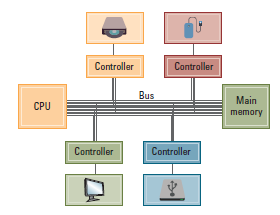
Controllers connect to the CPU and RAM through a shared set of wires called the bus. The bus carries signals — data, addresses, and control instructions — between all of the components attached to it.
Crucially, controllers sit on the same bus as main memory. This means the CPU communicates with a controller using the same mechanism it uses to communicate with RAM: it sends data to an address on the bus. The controller is designed to recognize when the CPU is addressing it specifically, and responds accordingly. Main memory, meanwhile, is designed to ignore those same addresses.
This approach is called memory-mapped I/O. From the CPU's perspective,
sending data to a controller looks almost identical to storing data in RAM — it uses an
instruction very similar to STORE. The difference is simply which address is
targeted. Some addresses belong to RAM; others belong to controllers.
Memory-mapped I/O in plain terms: Certain RAM addresses are reserved for controllers rather than for stored data. When the CPU writes to one of those addresses, the message goes to the controller instead of into memory. The CPU does not need a separate set of instructions for talking to peripherals — it just uses addresses.
How the CPU Talks to a Controller
Because controllers sit on the same bus as RAM, the CPU can send data to a controller using
an instruction similar to STORE: build the bit pattern you want to send in a
register, then store it to the address assigned to that controller.
Receiving data works the same way in reverse. The CPU can read from a controller's
address using an instruction similar to LOAD. The value that comes back is
whatever the controller has prepared — a keystroke, a sensor reading, a status signal.
This elegance is worth pausing on. The CPU already knows how to LOAD and STORE. It does not need a new vocabulary to talk to peripherals. The same operations that move data in and out of memory also move data in and out of every device connected to the machine.
So What Is a Port?
A port is the physical connector — the socket on the outside of your computer — where a cable or device plugs in. If the controller is the translator working behind the scenes, the port is the door that lets external devices into the building.
Every port you can see on a computer connects, internally, to a controller. When you plug a USB drive into a USB port, you are not plugging directly into the CPU. You are connecting to a USB controller, which then manages the communication with the CPU on the drive's behalf.
Different ports are designed for different purposes — video output, audio, data transfer, network connection, power — and each has a controller behind it suited to that purpose. The variety of ports on a modern computer reflects the variety of controllers working inside it.
Why This Design Makes Sense
The controller-and-port model gives computers a crucial property: modularity. New devices can be added to a computer without redesigning the CPU. As long as a new device comes with a controller that speaks the bus protocol, the CPU can communicate with it using the same LOAD and STORE logic it already knows.
This is why you can plug almost anything into a modern computer — a decades-old USB keyboard, a brand-new external drive, a drawing tablet — and it works. The port provides the physical connection; the controller handles the translation; the CPU stays blissfully unaware of the device-specific details.
In the next reading, you will look at the most common ports found on today's computers and mobile devices. Now that you understand what a port and controller actually do, those physical connectors will make a lot more sense.