What Is Sound? (A Simple Scientific Explanation)
Sound is a kind of vibration moving through the air. When something shakes — like a guitar string, someone's vocal cords, or a speaker cone — it pushes and pulls the air around it. These repeated push-pull movements travel outward as sound waves.
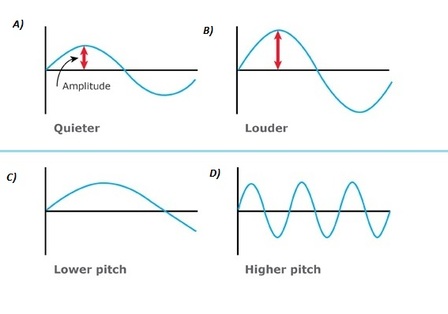
If you could freeze a sound wave and draw it as a line, it would wiggle up and down. Two key features of this wave help us understand the sounds we hear:
- Amplitude — how tall the wave is.
- Short waves mean softer sounds (Example A).
- Big, tall waves mean louder sounds (Example B).
- Frequency — how many times the wave repeats in one second.
- Slowly repeating waves produce low-pitched sounds (like a bass drum) (Example C).
- Quickly repeating waves produce high-pitched sounds (like a whistle) (Example D).
Turning Waves Into Data: Sampling
To store sound digitally, a computer uses a method called sampling.
At extremely small time intervals, the computer takes a sample — a measurement of how high or low the wave is at that moment. It stores each measurement as a number. When thousands of these samples are taken every second, the computer can play them back quickly enough for your ears to hear continuous sound.
The key question then becomes: how many samples per second is enough to capture sound faithfully? That's what the sample rate controls.
Sample Rate: How Often Do We Measure?
The sample rate tells us how many samples the computer takes every second. The more samples we have, the better the sound "sounds." Imagine a curve plotted on a piece of paper. If you ony put 3 dots on the paper, your "connected" line looks really ragged. But as you increase the number of points,the "line" formed begins to better approximate a curve.
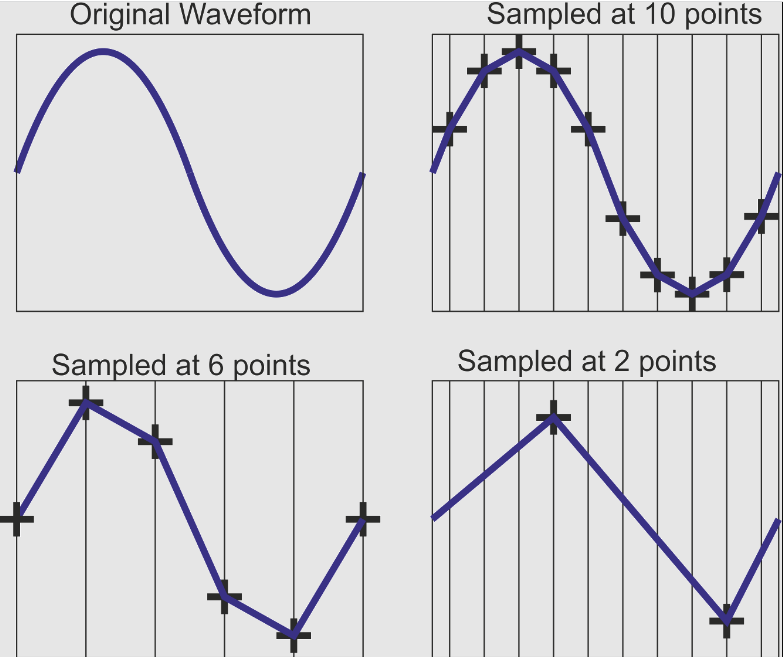
Higher sample rates capture more detail, but also create larger files. While some professional recording applications use as high as 192kHz, most computer applications use 44.1 or 48 kHz.
- 8,000 samples per second (8 kHz) — good for phone call audio.
- 44,100 samples per second (44.1 kHz) — CD-quality music.
Bit Depth: How Precisely Do We Measure?
Each sample not only stores the timing of the measurement, it must also store the amplitude of the sound at that moment. The bit depth tells us how many possible amplitude values the computer can record.
- 8-bit sound has 256 possible amplitude values.
- 16-bit sound has 65,536 possible values.
Higher bit depth means smoother, more detailed sound — especially for quiet or subtle audio — but also increases file size. In the end, think back to our discussion about images. While 8-bit color works, 24-bit color is the standard despite its increased size. Similarly, while 8-bit sound samples work, the standard is 16-bit.
Stereo vs. Mono
Digital sound can be recorded in:
- Mono — one audio channel
- Stereo — two audio channels (left and right)
Stereo requires twice the storage because the computer must keep track of two separate sets of samples.
How Big Is a Sound File?
Now that you understand sampling rate, bit depth, and channels, you have everything you need to calculate the size of an uncompressed audio file. The approach is the same one used for images and text: multiply out the total number of bits, then divide by 8 to convert to bytes.
For this course we use a sampling rate of 44,100 samples per second (CD quality) and a bit depth of 16 bits per sample. The number of channels will be either 1 (mono) or 2 (stereo).
The formula is:
Size (bytes) = Duration (seconds) × 44,100 × 16 × Channels ÷ 8
Worked Example
How large is 3 minutes of uncompressed stereo audio at CD quality?
| Step | What we are calculating | Result |
|---|---|---|
| 1 | Convert duration to seconds: 3 × 60 | 180 seconds |
| 2 | Multiply by samples per second: 180 × 44,100 | 7,938,000 samples |
| 3 | Multiply by bits per sample: 7,938,000 × 16 | 127,008,000 bits |
| 4 | Multiply by channels (stereo = 2): 127,008,000 × 2 | 254,016,000 bits |
| 5 | Convert bits to bytes: 254,016,000 ÷ 8 | 31,752,000 bytes |
Check: 180 × 44,100 × 16 × 2 ÷ 8 = 31,752,000 bytes ✓
That is over 30 MB for just three minutes of audio — which is exactly why compression formats like MP3 exist.
Now You Try
A teacher records a 5-minute spoken introduction to a lesson in mono at CD quality. How large is the uncompressed file in bytes?
Show answer
| Step | What we are calculating | Result |
|---|---|---|
| 1 | Convert duration to seconds: 5 × 60 | 300 seconds |
| 2 | Multiply by samples per second: 300 × 44,100 | 13,230,000 samples |
| 3 | Multiply by bits per sample: 13,230,000 × 16 | 211,680,000 bits |
| 4 | Multiply by channels (mono = 1): 211,680,000 × 1 | 211,680,000 bits |
| 5 | Convert bits to bytes: 211,680,000 ÷ 8 | 26,460,000 bytes |
Check: 300 × 44,100 × 16 × 1 ÷ 8 = 26,460,000 bytes ✓
Compressed Audio: Making Sound Files Smaller
Because raw sound files grow large very quickly, most digital audio uses compression. Formats like MP3 shrink the file size by removing details that the human ear is unlikely to notice.
This is why a three-minute song might be 40 MB as uncompressed audio, but only about 5 MB as an MP3.
Summary
- Sound is vibration traveling as waves.
- Amplitude determines loudness; frequency determines pitch.
- Computers store sound by sampling waves many times per second.
- Sample rate controls how often measurements are taken.
- Bit depth controls how precisely each measurement is stored.
- Stereo sound uses two channels and doubles storage.
- Uncompressed audio grows quickly; compression formats reduce size.