Conducting Peer Reviews for the Games Assignment
Introduction
Part of learning about programming is learning to write code. But another part is learning how look at other people's code to see what they did and HOW they did it.
One of the things that we ask you to do in this course is that each time you submit a homework assignment you submit it for consideration by your peers (what you did when you shared at the end of the assignment.) Sometime AFTER that we ask you to conduct a minimum of four peer reviews.
Conducting a Review
- Click on the link below to load the "Progress Table" for the Scratch programs. This will take to you a table of students in the course and links to the programs that they have submitted.
- Scratch Program Progress Table
- NOTE: This table is auto-generated every 30 minutes. Therefore, you may not immediately see your program here.
- In this table locate the column for this assignment.
- Animation
- Locate any program in the table that comes from one of your classmates.
- A program has been submitted if it contains any of these icons:
 - Project has not yet passed peer review. Please give priority to looking at programs with this icon.
 - Project has passed peer review.
 - Project has been flagged as not meeting requirements.
- A program has been submitted if it contains any of these icons:
- If you click on an icon in the table it will take you to the Scratch website to the publicly shared page for that program.
- Test/Evaluate their submission by doing the following things:
- "Run" when the green flag is pressed.
- Conduct a proper "places everyone."
- Use at least three different sprites in your program
- One of these should be a human controlled player which uses either mouse or keyboard actions to control the main character.
- The other two (or more) should be Non-Player Characters (NPCs) which are computer controlled players that can be either good (help the main character) or bad. These need not necessarily move around the screen (like the bananas did ) but they should contain code that causes them to do things.
- Set up your game so that the main character "interacts" with the other sprites. For example, the main character might collect gold coins. Or, the main character might need to get across the screen without touching the poisoned mushrooms. Either way, the act of the main character touching these other characters causes something (good or bad) to happen.
- At least one of your characters should have multiple costumes that are used in some capacity (I know that is vague but I want you to have freedom to use it as you like)
- Use at least two variables that keep track of two unique things.
- There should be differences in the way the game plays at different times based on those variables.
- There should be a clear sense of "winning" or "losing" both in how the game is played AND how the game reacts to what you do when you play (Don't just stop scripts. Have a "you win" or "you lose" message too).
- Click on the "See Project Page" button and scroll down to the comment section. Leave a comment containing all of the following information:
- One of the two "key phrases" NOTE: You must use these exact phrases.
- If you answered yes to all of the questions in step #5 you should include the phrase Meets Expectations
- If you answered no to any one of the questions in step #5 you should include the phrase Problems and explain what you found missing/lacking in the assignment
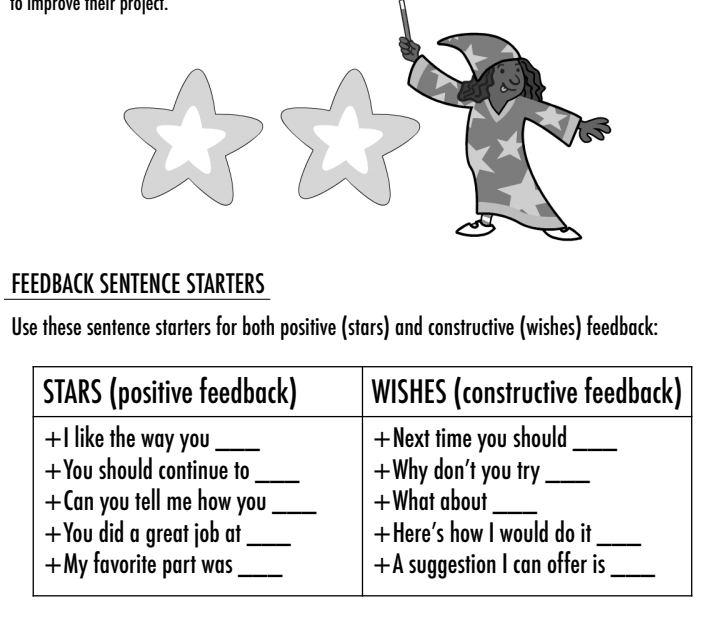
- At least two pieces of positive feedback (for ideas, consider the STARS sentence starters below).
- At least one piece of constructive feedback (consider the WISHES sentence starters below).
- One of the two "key phrases" NOTE: You must use these exact phrases.
- Now take a few minutes to consider what the programmer did in their program that:
- Is similar to what you did?
- Is different from what you did?
- Surprises you?
- Is something you could learn from?
Repeat for a total of four classmates.